How to Choose School Management Software in India: A 2026 Checklist
A practical 2026 checklist for comparing school ERP software in India: modules, data ownership, parent adoption, pricing and demo questions.
For Indian K-12 schools
SchoolKonnect is a complete school ERP: admissions, attendance, fees, exams and report cards, timetable, HR and payroll, transport, front office and a parent app — one platform, one set of records, hosted in India.
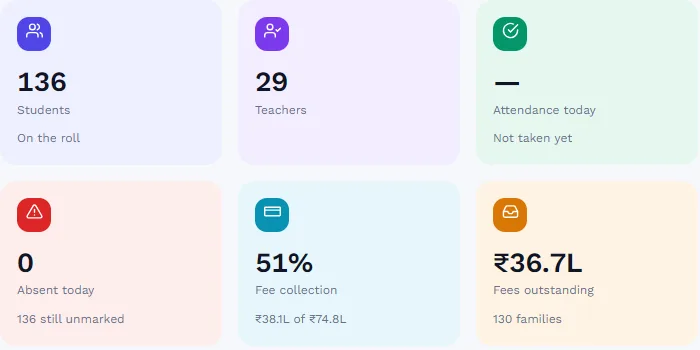
SchoolKonnect is an all-in-one school ERP for Indian K-12 schools — CBSE, ICSE and state boards — with a built-in AI assistant (SIA), a separate database for every school hosted in India, and parent alerts by app, WhatsApp, SMS and email.
School management software — often called a school ERP — is a single system that runs a school’s daily work: admitting students, marking attendance, billing and collecting fees, running exams and report cards, scheduling teachers, paying staff, managing buses and keeping parents informed.
The difference between a good one and a frustrating one is simple: whether every part shares the same records. When a new student is admitted in SchoolKonnect, they are billed, appear on the class register and the exam roll, and their parents get access to the parent app — in one step. Nobody types the same student twice.
Choosing a system? Our 2026 buyer’s checklist for Indian schools lists the questions to ask in every demo.
Switch on what you need today and add the rest when you are ready. Every module shares the same students, staff, classes and fees.
Set fee heads once, bill every student correctly, collect at the counter or online, and know exactly who still owes what — without a spreadsheet in sight..
Teachers mark the register on any phone.
Set up the exam, let each teacher enter marks for only their own papers, and publish results to families the moment the office approves them..
Every walk-in, call and online form becomes an enquiry you can follow up.
Parents see their child’s week at a glance — attendance, homework, fees, diary and results — and can message teachers, pay fees and request early pick-up without calling the office..
Each teacher opens SchoolKonnect to a short list of what needs doing today, their own timetable, and their own students — nothing else to learn..
Know which child is on which bus, who is driving it, and whether it is over capacity — before the first trip of the morning..
Every visitor signed in and out, every early pick-up approved and recorded, every parcel handed over — and parents told the moment their child leaves..
Staff attendance and approved leave flow straight into the monthly payroll run, so salaries are right first time and payslips are ready the same day..
SIA, the SchoolKonnect Intelligence Assistant, answers everyday questions from your school’s own data and takes you to the right screen to act on them..
Teachers schedule a live class for their section; students join from the app they already use.
Most schools we meet run on a mix of the first two columns. This is what changes when everything runs on one platform.
| Area | Registers & spreadsheets | Separate apps | SchoolKonnect |
|---|---|---|---|
| Student records | Separate registers per office | One copy per app, often out of step | One record used by every module |
| Attendance | Paper register, typed in later | Teacher app, not linked to fees or exams | One-tap marking, live school-wide view |
| Fees | Receipt books and a ledger | Fee software that misses class changes | Billing follows admissions and class changes |
| Report cards | Master spreadsheet from every teacher | Exam tool with its own student list | Teachers enter marks; parents download results |
| Parent communication | Circulars and class WhatsApp groups | An app few parents install | App plus WhatsApp, SMS and email from one place |
| Data protection | Files on shared computers | Data spread across vendors | Hosted in India, a database per school, role-based access |
Exams, terms, components and report cards are configured for each school, so the structure your board expects can be set up.
Run your CBSE school’s exams, internal assessment, report cards, attendance and fees in one platform — with the student records that board registrations, APAAR and UDISE+ depend on kept accurate all year..
Read moreCISCE schools run detailed assessment across many subjects and groups.
Read moreEvery state board has its own exams, grading and paperwork.
Read more
On Microsoft Azure in India.
Never mixed with another school’s records.
Each role sees only what it needs.
Who changed what, and when.
The best school management software is the one that solves your school’s biggest daily problems — usually fee follow-up, attendance and report cards — in one system that teachers and parents actually use. Compare products on the modules they include, where your data is stored, how parents are reached, how easy it is for teachers, and what the full cost is including setup, messages and training. SchoolKonnect covers all of these in one platform, hosted in India.
In India the two terms are used for the same thing: one system that runs a school’s administration, academics, finance and communication. “ERP” is more common when the system includes accounts, payroll and inventory alongside academics.
Most school ERP software in India is priced per student per year, sometimes with a one-time setup fee. Check whether all modules, SMS and WhatsApp messages, data migration and staff training are included before comparing quotes. Contact us for SchoolKonnect pricing for your school.
At minimum: admissions and student records, student and staff attendance, fees, exams and report cards, timetable and teacher tools, parent communication, HR and payroll, transport, front office and library. All of them should share one set of student and staff records.
It can be safer than registers and spreadsheets, if the vendor stores data in India, separates each school’s data, restricts access by role and keeps an audit trail. SchoolKonnect is hosted on Microsoft Azure in India with a separate database for each school.
Yes. Terms, exams, paper components, grading and report cards are configured for each school, so the structure your board expects can be set up. See our pages for CBSE, ICSE and state-board schools.
Most schools start with student records, attendance and fees in the first weeks, then move exams and the remaining modules once staff are comfortable. Starting at the beginning of a term is easiest.
No. SchoolKonnect works in any phone browser for parents and teachers. Important alerts can also go by WhatsApp, SMS and email for families who do not use the app.
A practical 2026 checklist for comparing school ERP software in India: modules, data ownership, parent adoption, pricing and demo questions.
Practical steps Indian schools use to cut overdue fees: clear fee structures, timely reminders, online payment, consistent late fees and early talks.
What India’s DPDP Act 2023 means for schools handling children’s data: parental consent, purpose limits, security, breaches and vendors.
Book a 30-minute walkthrough. We’ll set up a demo school with your classes and fee heads so your team sees exactly how a day would run.