Making Report Cards Less Painful: An Exam and Marks Workflow for CBSE and State-Board Schools
A step-by-step exam workflow for Indian schools: exam setup, paper components, teacher marks entry, remarks and publishing report cards.
Teacher app & timetable
Each teacher opens SchoolKonnect to a short list of what needs doing today, their own timetable, and their own students — nothing else to learn.
Attendance not taken, homework to publish, diary to complete — in order of urgency.
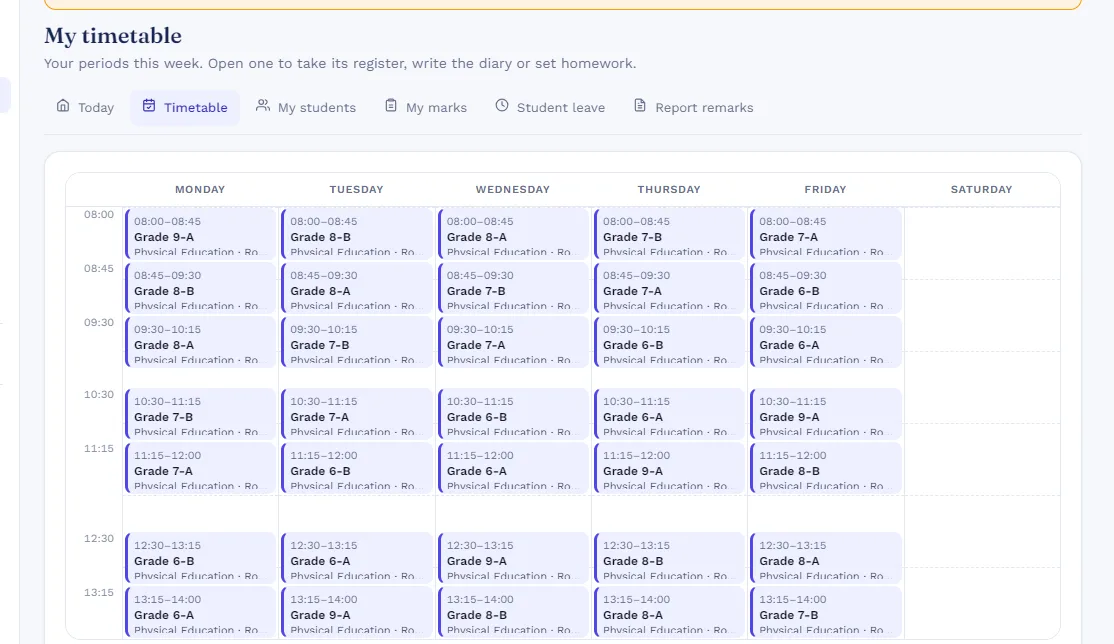
Their periods for the week; open a period to take the register or set homework.
Set homework with attachments and keep the class diary parents can read.
Enter marks for their own papers and write report-card remarks per student.
Bell timings, periods, rooms and teacher loads, with clashes caught before publishing.
Lesson plans, assignments, rubrics and a question bank when the school is ready for them.

Teacher app & timetable shares its records with every other SchoolKonnect module — students, classes, staff and fees are entered once and used everywhere. That is why reports add up and parents see the same figures as the office.
See every moduleVery little. The teacher home is a to-do list of the day’s tasks, and in-app guided tours walk through each screen the first time.
Yes. Set bell timings and periods, assign teachers and rooms, and the builder flags clashes before you publish.
Yes. Teachers see their own classes, subjects and students; access is set by role.
A step-by-step exam workflow for Indian schools: exam setup, paper components, teacher marks entry, remarks and publishing report cards.
A grounded look at AI for Indian school offices: answering questions from school data, drafting messages, spotting patterns — and the limits to set.
Book a 30-minute walkthrough. We’ll set up a demo school with your classes and fee heads so your team sees exactly how a day would run.